What the graph adds
Extract and Synthesize produce facts and discovered items. The Graph destination turns those into a connected estate: named entities, classified by kind, joined by verified relationships, with the questions it could not resolve recorded rather than dropped.
The graph is additive. A harness can be completed, verified, released, and published without one. What the graph unlocks is visual exploration, the Review counts, and the Asset Inventory.
Build the graph
The build runs as a sequence of named steps, and each one reports what it produced.
| Step | What it produces |
|---|---|
| Identifying entities | The candidate things the sources describe |
| Classifying entities | The kind each entity belongs to |
| Writing capability summaries | Plain-language summaries of what capabilities do |
| Mapping relationships | Candidate links between entities |
| Verifying relationships | The links the evidence actually supports |
| Recording open questions | What could not be resolved, kept rather than discarded |
| Running final checks | Consistency of the committed result |
You can pause a build and resume it; it continues from where it stopped rather than starting again. An interrupted build offers Resume build; a failed one offers Retry build.
Explore the connected estate
The graph opens as a spatial stack of the whole estate. It is deliberately progressive: begin with the shape of the system, open one plane, then inspect an object and trace its connections only when you need the detail.
| View | What it answers | How to use it |
|---|---|---|
| Stack | Which knowledge planes exist, and where is the estate concentrated? | Compare plane counts, then choose the plane relevant to the decision |
| Plane | Which kinds and objects make up one concern? | Group by lens, expand a kind, search, or select a node |
| Object | What is this thing, what evidence supports it, and what belongs with it? | Read its summary, kind, membership, and evidence status |
| Relationships | What does this object connect to, and how far does the effect travel? | Trace first-, second-, or third-degree connections; switch between clustered and expanded layouts |
The current stack uses eight planes:
| Plane | What it brings together |
|---|---|
| Capability & Intent | Capabilities, journeys, rules, and product intent |
| Governance & Compliance | Controls, obligations, approvals, and governance findings |
| Reliability & Signals | Failure behaviour, observability, resilience, and operational signals |
| Runtime & Ops | Runtime components, infrastructure, jobs, and operational assets |
| Data & Lineage | Data structures, stores, movement, and lineage |
| Behavior & Flow | Call chains, interface mappings, business journeys, and UI flows |
| Structure & Estate | Components, dependencies, domains, and estate structure |
| Knowledge & Findings | Knowledge artefacts, evidence-backed findings, and unresolved questions |
Within a plane, grouped maps keep a large estate readable by showing representative nodes and an honest “more” count. Use search to jump to a node, select it for a concise explanation, expand its group for the object view, and choose Trace connections to follow supported relationships.
The Review counts
The Review destination presents ten tiles in three bands, running from what SOCK read to what counts as consumption. Each tile explains itself and gives a worked example.
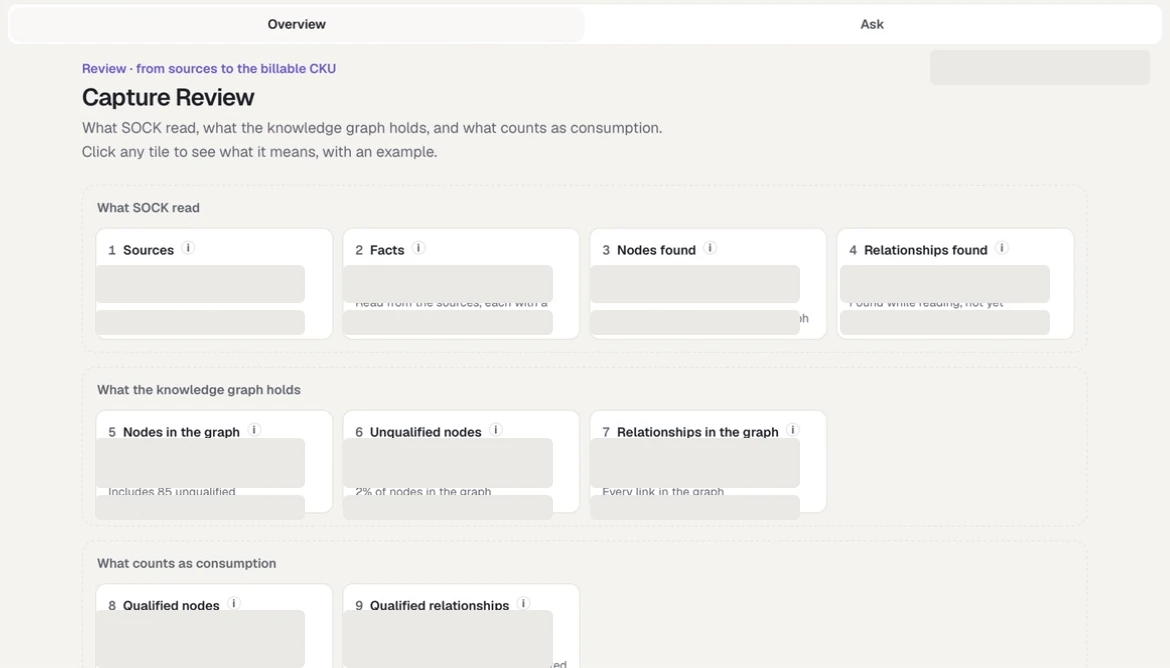
Review preserves the path from source evidence to graph qualification and CKU consumption. All harness identifiers, measurements, and estate-specific examples are masked in this capture.
What SOCK read
| # | Tile | Meaning |
|---|---|---|
| 1 | Sources | Documents, code repositories, and databases present when the source list was locked. Nothing changes after this |
| 2 | Facts | Individual facts SOCK read from the sources. Each one has a citation |
| 3 | Nodes found | Things SOCK found while reading, before the graph was built |
| 4 | Relationships found | Possible links between nodes, found while reading, not yet confirmed |
What the knowledge graph holds
| # | Tile | Meaning |
|---|---|---|
| 5 | Nodes in the graph | Every node — qualified and unqualified together |
| 6 | Unqualified nodes | Nodes the sources mention that SOCK could not identify. Kept so the relationship is not lost |
| 7 | Relationships in the graph | Every relationship in the knowledge graph |
What counts as consumption
| # | Tile | Meaning |
|---|---|---|
| 8 | Qualified nodes | Nodes SOCK identified as real. These count toward CKU consumption |
| 9 | Qualified relationships | Relationships between two qualified nodes, counted once. These count toward CKU consumption |
| 10 | CKU Consumption | The billable figure derived from tiles 8 and 9 |
How CKU is calculated
CKU — Connected Knowledge Units — is the consumption measure for captured knowledge. It is computed only from the committed graph, so a harness without one has no CKU figure to show.
QN  = qualified nodes
QE  = qualified relationships
CKU = ⌈ (QN + QE) ÷ 1000 ⌉
The rules behind the two inputs:
- A qualified node is one SOCK resolved to a real thing. Unqualified nodes — the placeholders that name something the sources mention but SOCK could not identify — are excluded.
- Inferred nodes are included. Reasoned knowledge still counts.
- No node kind is excluded by its type.
- A qualified relationship joins two qualified nodes, is counted once per distinct subject-relation-object, and never joins a node to itself.
Enterprise and workspace administrators can see consumption across workspaces in usage, CKU and activity monitoring.
Who can see the graph and the counts
A harness is shown the same way wherever it lives, and the graph and Review counts travel with it.
| Where the harness lives | Graph | Review counts and CKU | Ask |
|---|---|---|---|
| Working — your live harness | Yes, and you can build it | Yes | Yes |
| Local release — your own sealed version | Yes, read-only | Yes | Yes |
| Downloaded — a teammate's published version | Yes, read-only | Yes | Yes |
A sealed harness — released or downloaded — never runs processing. Stage actions are absent rather than disabled, and everything you can open is a read of what was published.