What the Asset Inventory is
The Asset Inventory is a generated report over everything a harness found: the concrete, countable things that make up a software estate — endpoints, schemas, tables, jobs, policies, dashboards, models, documents, and more — organised into families and types, each one traceable to the evidence behind it.
Its value is the combination of breadth and drill-down. A family-level view shows the shape of an estate; a type-level list makes a specific class of asset discoverable; an asset record shows why it exists in the report. Teams can use that path to find migration scope, duplicated technology, unowned interfaces, delivery and runtime dependencies, security-relevant assets, or gaps between expected and observed estate coverage.
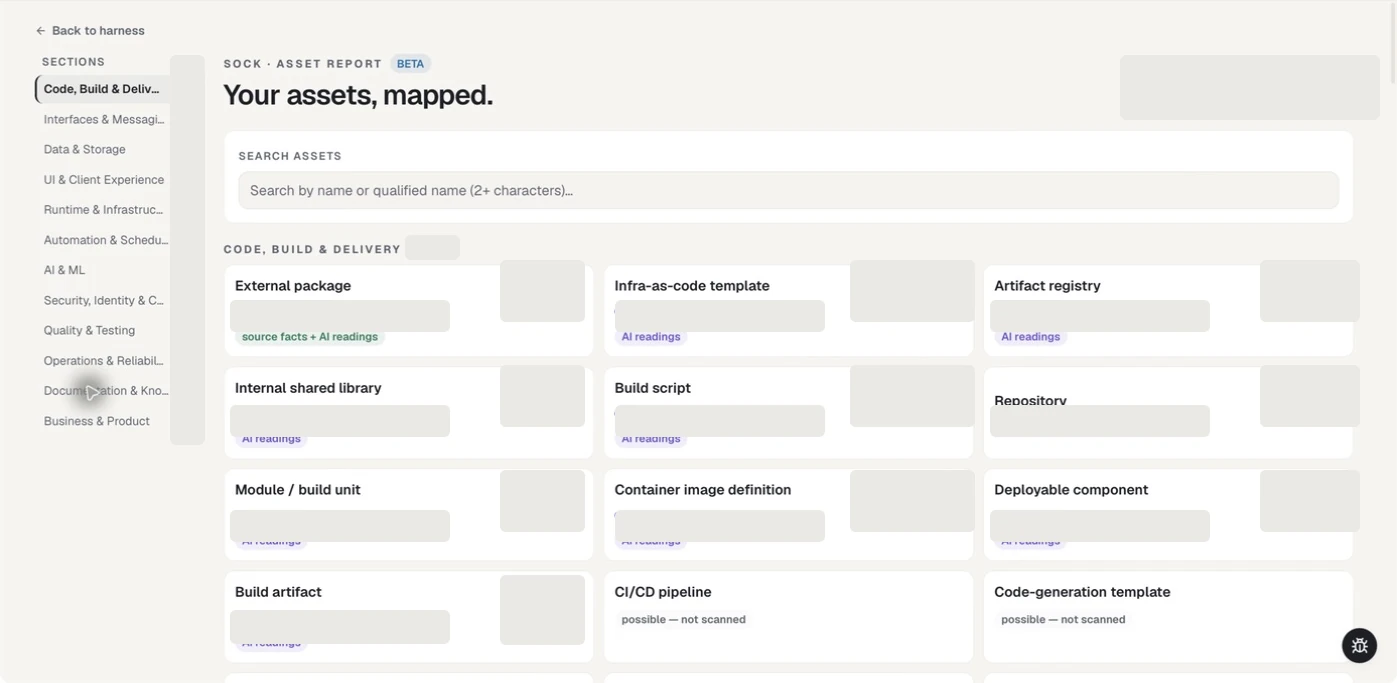
The family and type layout makes a large estate browsable without flattening everything into one list. This image comes from a populated report, but all estate-specific counts and identifiers have been irreversibly masked.
The rail node opens once the graph is committed. Some stage screens also offer Open report at the point where the report becomes useful.
Build the report
The report is produced in three phases, shown as a journey across the top of the page.
| Phase | What happens |
|---|---|
| Prepare | The worklist is assembled from the harness's own knowledge |
| Mine assets | The mining session works through that list. You can watch the live session in a read-only terminal |
| Publish | The finished report is written and becomes readable |
Two build paths are offered:
- Build the initial report (no AI mining) produces the deterministic report immediately, from what the harness already recorded.
- Create my report runs the full arc, including AI mining, for a considerably richer result.
Mining pauses for your review before it starts work that costs time and money. Until you approve it, the journey shows Waiting for your review….
The 12 asset families
| Family | What it covers |
|---|---|
| Code, Build & Delivery | Source, build, packaging, and delivery artefacts |
| Interfaces & Messaging | APIs, event contracts, and message formats |
| Data & Storage | Schemas, tables, collections, and data contracts |
| UI & Client Experience | Screens, client applications, and interface assets |
| Runtime & Infrastructure | Containers, manifests, infrastructure definitions, and configuration |
| Automation & Scheduling | Jobs, schedules, pipelines, and automation |
| AI & ML | Models, endpoints, prompts, knowledge stores, and agents |
| Security, Identity & Compliance | Policies, identity definitions, certificates, findings, and compliance artefacts |
| Quality & Testing | Test results, coverage, and quality evidence |
| Operations & Reliability | Telemetry, alerting rules, dashboards, and service objectives |
| Documentation & Knowledge | Documents, diagrams, decision records, and vocabularies |
| Business & Product | Business processes, decisions, requirements, and journeys |
Within those families the report recognises 127 asset types, each defined against a published format or a well-known convention — OpenAPI, AsyncAPI, JSON Schema, Avro, CycloneDX, SPDX, Terraform, Kubernetes manifests, Dockerfiles, OPA Rego, SARIF, OSCAL, BPMN, DMN, Gherkin, Model Cards, Mermaid, PlantUML, C4, and many more.
Read the report
- Start at the family level for the shape of the estate.
- Drill into a type to see every asset of that type. Drill-down is page navigation, so the browser's back button works.
- Open an asset to see its detail, its source, and the evidence excerpt behind it.
- Search by name or qualified name from two characters upwards.
- Show n/a types reveals the types that produced nothing, so an empty category is visible rather than silently missing.
Use the inventory for a decision
| Decision | Start with | Then verify |
|---|---|---|
| What must move or be retired? | Repository, deployable component, database, queue, job, and infrastructure types | Asset evidence, owners, dependencies, and graph relationships |
| Which interfaces need compatibility planning? | API, event, schema, message, and contract types | Consumers, versions, interface mappings, and Known Unknowns |
| Where could delivery or operational risk concentrate? | Build, pipeline, runtime, telemetry, alert, and service-objective types | Whether each asset is verified or inferred and which sources were in scope |
| What reusable capabilities already exist? | Shared library, service, model, prompt, knowledge-store, and template types | Qualified name, source, evidence, and current lifecycle status |
| Where is coverage unexpectedly empty? | Show n/a types and families with low or zero findings | Whether the asset is truly absent or the necessary evidence was not captured |
The inventory supports discovery and triage; it does not replace ownership, security, licensing, or lifecycle review. Counts are always relative to the locked source boundary.
Evidence
An asset carries the source lines that produced it. Earlier releases withheld that excerpt for several type families; that restriction was removed because it hid more than half the report's value while protecting nothing — you are reading your own locked sources on your own machine.
Treat the excerpt the way you treat any captured source content: it can contain sensitive business data, and your organisation's classification and handling policy applies.
Export
Any level of the report can be exported as JSON. A large type export is capped, and the file states honestly that it contains the first N of M rows.
If the report is rebuilt while an export is running, the export aborts and no file is written, rather than splicing two different generations into one file. Run it again.
Availability
| Where the harness lives | Asset Inventory |
|---|---|
| Working — your live harness | Build and read |
| Local release — your own sealed version | Read the published report |
| Downloaded — a teammate's published version | Read the published report |
A harness whose report was never built shows an honest "no report" state rather than an error. Desktop only — the report cannot be opened from the web application.