Harness, sources, and locking
A harness is a connected set of knowledge created from your selected sources. It is the object you create, name, run, review, and release.
| Term | Meaning | Operational consequence |
|---|---|---|
| Harness | A connected set of knowledge created from selected sources | The unit you create, run, release, and publish |
| Sources | The preparation destination for repositories, files, knowledge artifacts, connected systems, and attributed human knowledge | Review, preview, annotate, and lock the complete boundary before processing starts |
| Lock the source list | A permanent lock of the prepared source set | You cannot add, remove, or replace sources afterwards |
| Completed and verified | The state a harness reaches when every stage has finished and the chain has been verified | Ask opens; the Release destination opens |
Source types and current connectors
The Add source dialog has four tabs.
| Tab | What it accepts | Current behaviour |
|---|---|---|
| Local Repositories | Repositories and folders on this machine | Read and prepared in place; copied into the harness boundary when you lock the list |
| Connect System | PostgreSQL, MongoDB, or Oracle | Connected read-only; browse the available structure, select an approved scope, and optionally include bounded samples |
| Knowledge Artifacts | Documents and other approved local files | Copied and fingerprinted; extraction depth varies by format |
| Add Tacit Knowledge | Attributed Markdown notes | Preserves decisions, context, ownership, and operational knowledge that system artefacts do not contain |
The processing stages
The Harness rail destination holds three tabs.
| Tab | Purpose | Durable result |
|---|---|---|
| Scan sources | Measure what was supplied, then analyse a safe work sequence | Source registry, inventory, verification records, structure and technology signals, coverage boundary, and the extraction order |
| Extract | Create deterministic facts and validated interpretations | Declared structures, per-source knowledge documents, official facts, citations, and Known Unknowns |
| Synthesize | Read across every extracted source at once, then derive deeper candidate knowledge | Discovered items that no single source shows, plus evidence-linked node and relationship candidates marked as inferred |
Two further destinations continue the journey:
| Destination | Purpose | Durable result |
|---|---|---|
| Graph | Identify and classify entities, write capability summaries, map and verify relationships | A committed knowledge graph of the connected estate |
| Review · Ask | Read the counts from sources through to billable CKU; ask bounded questions | Cited answers, explicit scope limits, and Known Unknowns |
Discovered items, dimensions, and lenses
These terms describe three levels of organisation.
| Concept | Example | What it is not |
|---|---|---|
| Dimension | call-chain or security-posture | Not a promise that every harness contains useful content in every category |
| Discovered item | A specific payment retry call chain | Not another name for a dimension |
| Lens | Security, or Change & risk | Not an engine concept; it does not change stored knowledge |
The lenses are Structure, Integration, Reliability, Security, Change & risk, and Other. All removes the filter. Lenses change only what you see.
The 21 authored dimensions
SOCK ships 21 authored dimension readers. Together they provide a consistent way to inspect business behaviour, software structure, data, operations, risk, and change seams.
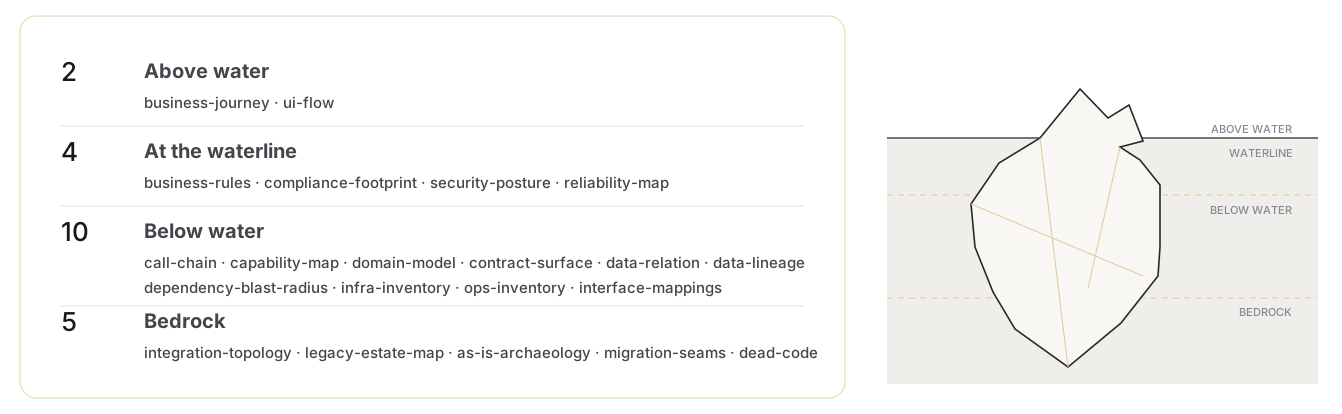
A conceptual depth view of the dimensions. The layers explain visibility and discovery depth; they are not engine states or UI lenses.
| # | Identifier | Knowledge focus | Lens |
|---|---|---|---|
| 1 | call-chain | Execution paths across functions, jobs, services, modules, and external calls | Structure |
| 2 | business-journey | End-to-end customer, user, and operational journeys | Structure |
| 3 | business-rules | Decision logic, calculations, validation, routing, and policy constraints | Structure |
| 4 | ui-flow | Screens, states, navigation, actions, validation, and supporting behaviour | Structure |
| 5 | data-relation | Relationships among entities, records, keys, schemas, and joins | Structure |
| 6 | data-lineage | Data origin, movement, transformation, persistence, and downstream use | Structure |
| 7 | domain-model | Domain concepts, vocabulary, responsibilities, and bounded contexts | Structure |
| 8 | capability-map | Business and technical capabilities and the components that realise them | Structure |
| 9 | contract-surface | APIs, events, files, schemas, commands, and declared contracts | Integration |
| 10 | interface-mappings | Interface boundaries to the outside world and across internal seams, including partner messaging and batch feeds | Integration |
| 11 | integration-topology | Connected systems, routes, protocols, directionality, and hubs | Integration |
| 12 | reliability-map | Failure, retries, timeouts, recovery, observability, and resilience | Reliability |
| 13 | ops-inventory | Jobs, schedules, runbooks, controls, utilities, and support procedures | Reliability |
| 14 | infra-inventory | Runtime, compute, network, storage, middleware, and deployment components | Reliability |
| 15 | security-posture | Identity, access, secrets, trust boundaries, exposure, and controls | Security |
| 16 | compliance-footprint | Obligations, controls, audit evidence, and regulated-data handling | Security |
| 17 | dependency-blast-radius | Upstream and downstream dependencies that can transmit change | Change & risk |
| 18 | migration-seams | Boundaries for extraction, replacement, coexistence, and phased migration | Change & risk |
| 19 | dead-code | Implementation that appears unused, unreachable, superseded, or orphaned | Change & risk |
| 20 | as-is-archaeology | Current implementation reality, historical residue, and undocumented structure | Change & risk |
| 21 | legacy-estate-map | Mainframe and legacy components behind a modern product, and what resists modernisation | Change & risk |
Facts, evidence tiers, and honesty
Every accepted fact is retained with a citation back to its source. The system keeps how a fact was obtained visible: a parsed declaration, a live observation, an AI interpretation, and a human report are not equally strong.
- AI components propose interpretations; validated application code writes the official record.
- The model cannot promote its own output to a stronger evidence tier.
- A human report stays attributed and cannot outrank a parsed declaration.
- Missing, unexamined, unsupported, and unknown are distinct states.
- Inferred means reasoned from available evidence rather than stated directly in a source.
- Known Unknowns are questions or gaps the harness knows it cannot currently answer.
- Evidence-backed does not mean infallible; consequential decisions still require source review.
Known Unknowns are a product outcome
A useful knowledge system must show where its confidence ends. SOCK therefore preserves a Known Unknown when the captured evidence points to a real concern but cannot support a safe conclusion. Examples include a referenced component that is outside the source boundary, an integration endpoint whose owner is not present, conflicting configuration values, or one side of a call chain that has not been captured.
This is different from “nothing found.” It tells a reviewer three things:
- what the harness could establish;
- which evidence or relationship is missing or contradictory; and
- what source, owner, or follow-up could resolve the question.
Known Unknowns turn uncertainty into reviewable work. They reduce the risk of treating an incomplete scan as proof that a dependency, control, or impact does not exist.
Preview, notes, and tacit knowledge
| Capability | Use it for | Evidence effect |
|---|---|---|
| Preview | Inspect locked inputs or generated knowledge files, including README, Evidence, Known Unknowns, and dimension documents | Read-only inspection; it does not promote, edit, or validate a fact |
| Source note | Add source-specific context — owner, purpose, caveat, environment, or a deliberate omission | Context accompanies the source; it does not rewrite the underlying file, repository, or database export |
| Tacit Knowledge | Add a standalone Markdown note for architecture decisions, operational knowledge, terminology, or history absent from system artefacts | Locked as attributed, human-reported evidence and kept distinct from parsed or observed fact |
Runs, sessions, and the terminal
A run is one processing execution and its status. A session is an active interaction with Claude. Stages can expose a live terminal beside the stage view, showing the active session, commands, progress, and diagnostic output. The run-activity feed records stage events in a more scannable form.
- Use the terminal to understand what the active stage is doing and to diagnose a pause or failure.
- Use the activity feed for stage transitions and completed events.
- Do not treat a quiet terminal or a final line of text as authoritative completion.
- The stage status, persisted artefacts, task ledger, and durable completion markers are the source of truth.
Ask is a bounded librarian
Ask is a read-only interface over the facts and knowledge documents of one harness. It does not modify the harness and does not silently search beyond the locked source set. It lives as the second tab of the Review destination.
Durable state and recovery
Progress is judged from durable evidence on disk, not from a terminal appearing to finish. A crash, closed laptop, or network drop does not erase completed work; MSOCK offers the appropriate resume action from the last durable completion marker.
A harness that ran every stage but whose chain never verified is shown as Not verified rather than as a green tick — an honest fifth state, still navigable.