Before you download
The MSOCK desktop application brings SOCK knowledge and SOCI Cockpit together with desktop access to SOCM Command Center. The web launcher also provides SOCM Command Center and the MSOCK download entry point.
- SOCK and SOCI Cockpit run only in the desktop application.
- SOCM Command Center runs on the web and in the desktop application.
You need all of the following before the download is useful:
- Your enterprise and workspace have been onboarded to MSOCK.
- A workspace, enterprise, or platform administrator has invited you.
- You can sign in with the same email address that received workspace access.
- Your account has the roles and feature access required for the area you want to use.
- A workspace administrator has completed Set up workspace for your workspace. Until that finishes, the launcher tiles stay locked.
Two prerequisites that are not in the installer
MSOCK can install both of these for you on first run, but only on a machine that is allowed to install software and reach the internet. On a managed corporate desktop, raise the request before you install rather than after a failure you cannot diagnose.
| Prerequisite | Why it is needed | What to arrange |
|---|---|---|
| Python 3.12 | The SOCK engine runs on 3.12 specifically — 3.11 and 3.13 will not work | MSOCK downloads it on first run if it is missing, which needs access to github.com |
| Claude Code | MSOCK runs Claude Code for every session | Allow the first-run install, and provide a Claude account on a paid plan — Pro, Max, Team, or Enterprise. The free Claude.ai plan does not include Claude Code |
System requirements
| Requirement | macOS | Windows | Linux |
|---|---|---|---|
| Operating system | macOS 13 or later | Windows 10 version 1809 or later, or Windows 11, 64-bit | Ubuntu 22.04 LTS or 24.04 LTS |
| Processor | Apple Silicon or Intel | x86_64 | x86_64 |
| Platform extras | None | WebView2, already present on Windows 11 | None — the installer handles it |
| Requirement | Value |
|---|---|
| Memory | 8 GB, 16 GB comfortable |
| Free disk space | 10 GB to start |
| Screen | 1024 × 700 or larger |
Download and install
- 01
Sign in on the web
Go to
https://commandcenter.purplefabricai.net/and sign in with your invited account. - 02
Open the launcher
After sign-in, MSOCK Studio shows the product areas available to your workspace.
- 03
Choose Download MSOCK
At the bottom of the launcher, select Download MSOCK. This link appears on the web only — inside the desktop application you are already running MSOCK.
- 04
Choose your system
The download page detects your operating system and offers the matching build. Linux is installed from a command rather than a downloaded file.
- 05
Install and open MSOCK
Complete your operating system's installation flow, then sign in with the same invited account.
- 06
Complete first-run setup
The Welcome journey walks through Welcome → Appearance → Prerequisites → Work Folder. Prerequisites and Work Folder appear in the desktop application only.
Install on macOS
Download the disk image for your processor and install it in the usual way. Builds are signed with an Apple Developer ID and notarized by Apple, so Gatekeeper does not need an override.
To check which Mac build you need, open About This Mac from the Apple menu and look at Chip or Processor: Apple M-series means Apple Silicon, anything else means Intel.
Install on Windows
Download the setup executable and run it through your organisation's approved software-installation process.
Windows installers are Authenticode-signed under Intellect Design Arena Limited during the build.
Install on Linux
The Linux build targets x86_64 on Ubuntu 22.04 LTS or 24.04 LTS. Install it with the command shown on the download page; the script handles FUSE, the executable bit, PATH, and the desktop menu entry.
curl -fsSL https://commandcenter.purplefabricai.net/api/genesis/install.sh | bashIf curl is not available, use wget:
wget --no-config --check-certificate -O- https://commandcenter.purplefabricai.net/api/genesis/install.sh | bashFirst-run prerequisite checks
On first run, and from the Prerequisites step of the Welcome journey, MSOCK checks the machine and reports each result with a fix where one exists.
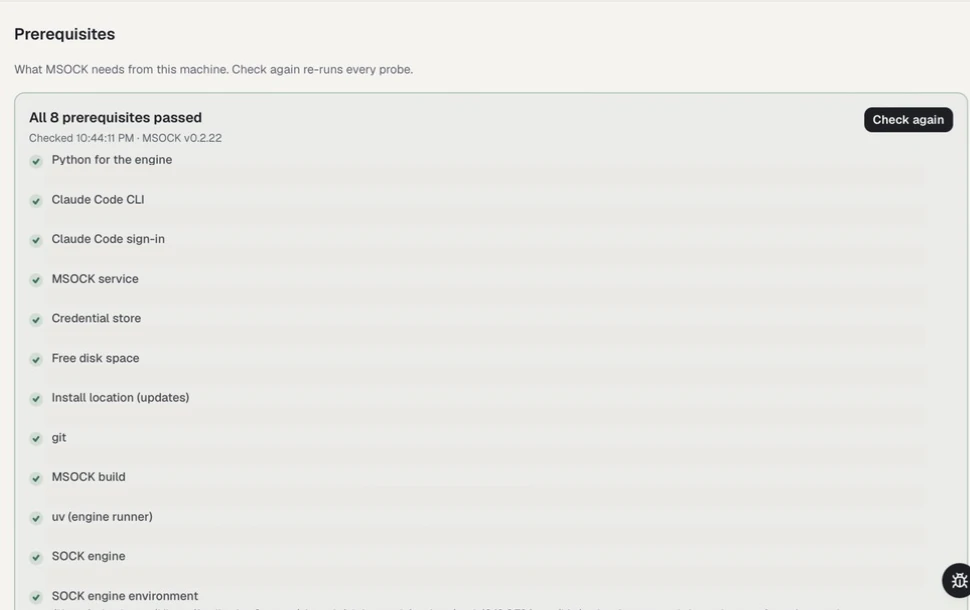
The checklist separates each required dependency so a failed probe has a specific remedy. Local paths, account state, service addresses, build metadata, and environment details are irreversibly masked.
| Check | What it confirms |
|---|---|
| Python for the engine | Python 3.12 is present, with a download route if it is not |
| SOCK engine · environment · version | The bundled knowledge engine is installed, usable, and recent enough for this application |
| uv (engine runner) | The tool that runs the engine is present |
| Claude Code CLI | Claude Code is installed |
| Claude Code sign-in | You are signed in to Claude Code |
| Free disk space | There is room to work |
| git | Present — recommended rather than required |
After installation
- Sign in with the email address invited to the onboarded workspace.
- Confirm the expected workspace appears in the launcher.
- SOCM Command Center opens for workspace members on web or desktop.
- SOCK requires the desktop application and the SOCK Creator or SOCK Knowledge Custodian role for anything that writes; SOCK Consumer is read-only.
- SOCI Cockpit requires the desktop application and its workspace feature.
- If every tile is locked, workspace setup has not finished — see set up a workspace.
Download and sign-in troubleshooting
| Problem | What to check |
|---|---|
| I cannot sign in | Confirm that your workspace is onboarded, you were invited, and you are using the exact invited email address |
| I cannot find Download MSOCK | It appears at the bottom of the launcher on the web only, not inside the desktop application |
| Every tile is locked | Workspace setup is still in progress; a workspace administrator completes it |
| The app installs but nothing runs | Check the Prerequisites step — Python 3.12 and Claude Code are installed separately from the bundle |
| Claude Code will not sign in | Confirm the account is on a paid plan; the free Claude.ai plan does not include Claude Code |
| I do not know which Mac installer to choose | Check About This Mac for an Apple M-series chip or an Intel processor |