One launcher, three product areas
After you sign in, MSOCK Studio is the launcher. It is the home every area returns to and is never hidden.
| Area | Full name | Question | Purpose | Where it runs |
|---|---|---|---|---|
| SOCK | System of Connected Knowledge | What might this change touch? | Understand the estate — build evidence-backed knowledge from a bounded source set and ask grounded questions | Desktop only |
| SOCI Cockpit | System of Connected Intelligence | How should the change be engineered? | Work with AI agents grounded in selected context, reusable guidance, tools, and controls | Desktop only |
| SOCM Command Center | System of Connected Methodology | How was the work allowed to proceed? | Govern the lifecycle — stages, gates, reviews, approvals, evidence, and visibility | Desktop and web |
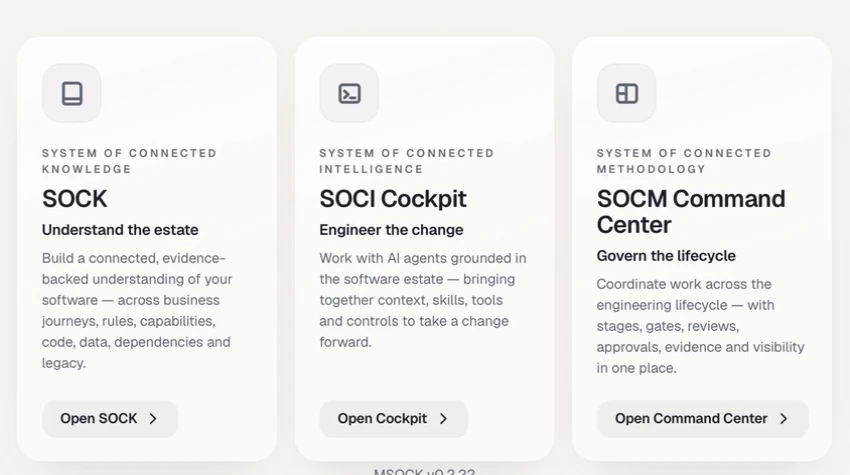
MSOCK Studio presents the three product areas around their outcomes: understand the estate, engineer the change, and govern the lifecycle. The capture is cropped to exclude member and workspace identity.
Two further surfaces sit beside the tiles:
- Admin Console — its own shell, reached from the chip at the top of the launcher. Visible to platform, enterprise, and workspace administrators.
- Download MSOCK — at the bottom of the launcher on the web only.
MSOCK is designed to sit across the engineering environment a team already uses, not to replace source control, work management, build and release tooling, identity, or observability. The current supported connections are documented under Connectors & integrations; availability varies by product area and deployment.
Feature availability
Each area is controlled by an entry in the Admin Console feature registry. An enterprise or workspace can narrow what the platform permits; it can never widen it.
| Admin Console entry | Status | Default when no explicit setting exists |
|---|---|---|
| System of Connected Knowledge | Generally available | On |
| AIDLC Cockpit | Generally available | On |
| Command Center | Generally available | On |
| Distribution | Generally available | On |
| SOCK Assistant | Generally available | On |
| System of Connected Intelligence | Coming soon | Off |
| Add-On Portal | Limited availability | Off |
| Cockpit Converged Chat | Limited availability | Off |
| Report a Bug | Limited availability | Off |
| Usage Telemetry | Limited availability | Off |
Roles
MSOCK uses four independent role dimensions. A person can hold values in several at once. See roles and permissions for the complete model.
Administration scope
| Role | Reach |
|---|---|
| Platform administrator | Every enterprise and workspace; platform-wide settings, operators, features, devices, add-ons, and bug reports |
| Enterprise administrator | One enterprise — its workspaces, users, features, and settings |
| Workspace administrator | One workspace — its members, roles, setup, and distribution |
Workspace persona
Eight personas drive lifecycle ownership and gate approvals in SOCM Command Center: Engineer, Capability Lead, Guild, Product, QA, Security, Release Manager, and Leader. Engineer is the usual default; Leader is a read-only view of board status.
SOCK role
| SOCK role | What it allows |
|---|---|
| SOCK Consumer | Read-only. Open harnesses, read knowledge, and ask questions |
| SOCK Creator | Everything a Consumer can do, plus create, run, and release; team publishing is available when distribution policy permits it |
| SOCK Knowledge Custodian | Identical to Creator today |
An unknown or missing SOCK role is treated as Consumer, so write actions fail closed rather than open.
Platform operator role
The operator directory labels platform identities as Platform Admin, Platform Operator, or Platform Support. The current application does not expose different capability branches for those three labels, so treat them as an operational classification rather than a public permission guarantee. Administrative scope and tenant context still decide which product actions are available.
Key personas
Engineer
Uses SOCM Command Center for day-to-day work and SOCI Cockpit for AI-assisted engineering when the workspace enables it.
Product manager
Tracks work and Gate 1 artefacts. PRDs and HLDs are produced through lifecycle commands rather than an in-app editor.
QA or reviewer
Works from the review queue and decides gate requirements.
SOCK Creator or Custodian
Builds and operates knowledge harnesses in the desktop application, and releases or publishes the result.
Workspace administrator
Runs workspace setup, manages members and roles, narrows features, handles distribution, and reads workspace usage.
Enterprise administrator
Creates and manages workspaces, sets the feature ceiling they inherit, and reads enterprise-wide usage and CKU consumption.
Platform administrator
Onboards enterprises, manages platform availability and operators, and triages devices, add-ons, and submitted bug reports.
Current boundaries
- MSOCK has no supported public REST API, SDK, connector extension point, or desktop plugin surface.
- The Add-On Market end-user portal is not available in this release. Add-on lifecycle management remains available to platform administrators in the Admin Console.
- Claude Code is the only supported agent runtime in this release; Codex does not appear in the model or provider selectors.
- SOCM Command Center can display Gate 1 PRD and HLD artefacts, but does not author them in the application.
- The standalone SOCI module is not an end-user Agent Designer, Flow Designer, or tool-building surface.
Older names you may still see
The product was called Genesis until the 2026-09 rename. Older documentation, release notes, screenshots, support articles, and some in-product strings still use the former names.
| Older name | Current name |
|---|---|
| Genesis | MSOCK |
| Genesis Studio | MSOCK, or MSOCK Studio for the launcher |
| Cockpit, AIDLC Cockpit | SOCI Cockpit |
| Command Center, Command Centre | SOCM Command Center |
| Capture (the SOCK object) | Harness, in member-facing screens |
| Freeze sources | Lock the source list |
| Survey | Scan sources |
| Discover & Infer | Synthesize |
| Seal / sealed | Verify and complete / Completed and verified |
| Unit (one job in a run) | Task |
| Surface (a discovered thing) | Discovered item, or the concrete object type |
Identifiers did not move with the words. Routes, URLs, file names, exported data, and API values still say capture, survey, discover, and genesis in places; only the words on screen changed.
Access and download
Invited users sign in at https://commandcenter.purplefabricai.net/. To install the desktop application, choose Download MSOCK at the bottom of the launcher.